HD Pigment
Hydrafacial
Hydrafacial
Couldn't load pickup availability
1. HD Hydrafacial Introduction to the Device
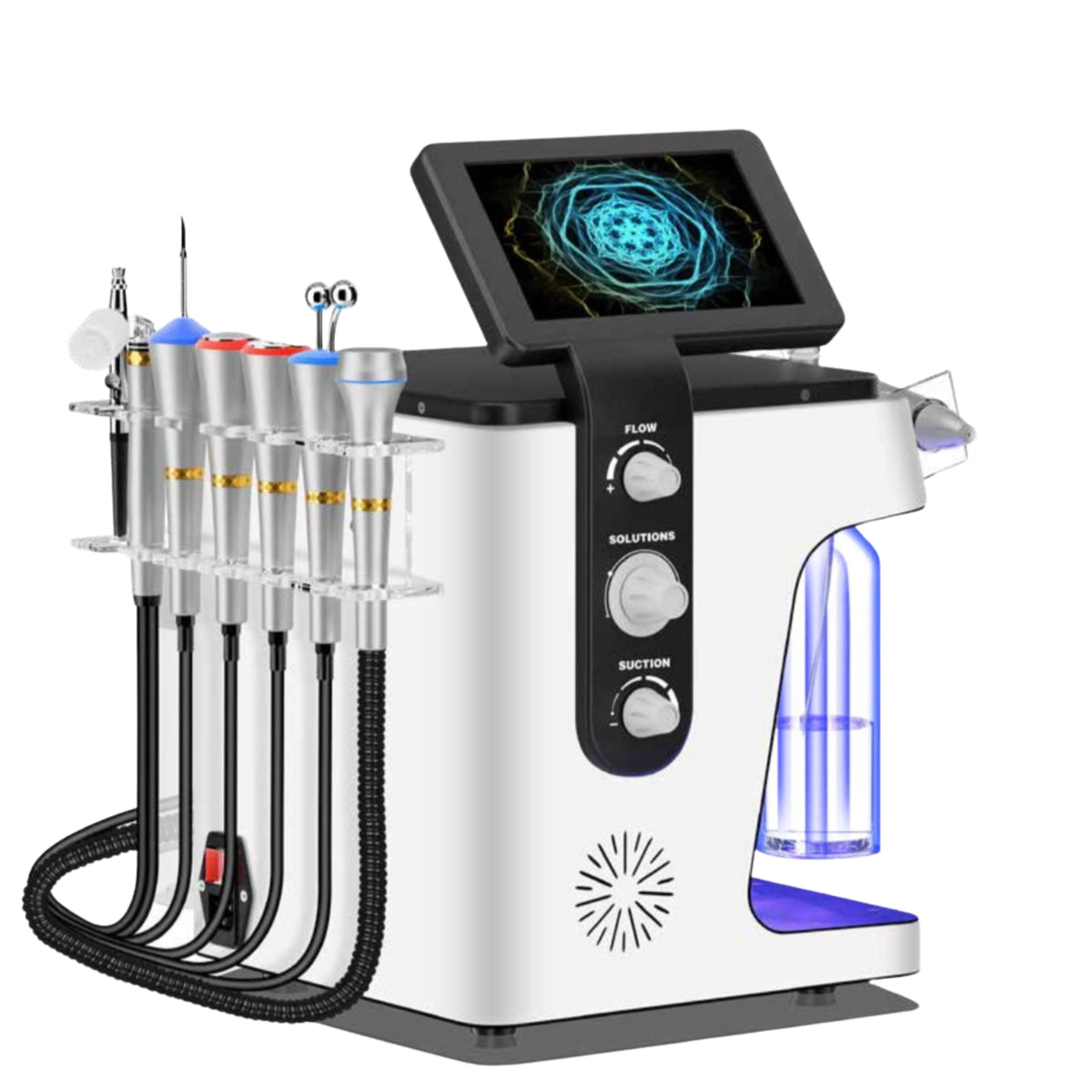
The M29 is a multifunctional beauty device designed to support a variety of professional facial treatments through interchangeable handpieces and selectable programs on its touchscreen interface.
Based on the available pages of the manufacturer's manual, the device includes the following functions:
-
Hydra dermabrasion with liquid flow and vacuum-assisted cleansing
-
Ultrasonic vibration
-
Oxygen spray
-
Ultrasound-assisted cosmetic product application
-
Radiofrequency (RF) facial treatment
-
EMS eye-area treatment
-
Cold and warm hammer treatment
-
A function labelled “Meso” in the device menu
The device features a touchscreen control panel, handpiece connection ports, liquid reservoirs, and controls for adjusting liquid flow and suction.
Important: The available manual images do not independently verify all technical specifications, including output power, operating frequencies, maximum vacuum pressure, temperature ranges, or the precise mechanism of each function.
2. Main Components and Controls
According to the diagram on page 13 of the manual, the approximate dimensions are:
-
Height: 46 cm
-
Width: 45.5 cm
-
Depth: 38 cm
The main components include:
-
Touchscreen: Used to select treatment programs and adjust settings.
-
Flow control: Used to regulate liquid flow.
-
Solutions control: Used to adjust the delivery of treatment solutions.
-
Suction control: Used to regulate vacuum suction.
-
Liquid reservoirs: Hold the solutions used for compatible treatments.
-
Waste-water bottle: Collects used liquid generated during treatment.
-
Handpiece connection ports: Connect the handpieces required for the selected functions.
-
Main power switch: Turns the device's electrical supply on and off.
The manual illustrates different adjustment ranges for the flow and suction controls. The precise direction and range of each adjustment should be confirmed against the manufacturer's instructions for the specific unit.
3. Operating the Touchscreen
After switching on the device, select the required treatment from the main menu.
|
Function |
Primary purpose |
|
Hydra Dermabrasion |
Liquid-assisted, vacuum-based skin cleansing |
|
Ultrasonic Vibration |
Ultrasonic vibration treatment |
|
Oxygen Injection |
Function described as oxygen spray |
|
Ultrasound Import |
Ultrasound-assisted cosmetic product application |
|
RF Face |
Radiofrequency facial treatment |
|
EMS Eyes |
Electrical stimulation for the eye area |
|
Cold & Warm Hammer |
Cooling and warming treatment |
|
Meso |
Function labelled as mesotherapy in the device menu |
Depending on the selected program, the interface allows adjustments to treatment time and intensity. The Meso menu also displays automatic mode, M1–M4 programs, continuous output, and dosage adjustment.
Safety principle: Begin at the lowest appropriate setting and increase intensity only within the limits specified by the manufacturer. A program name alone does not establish the treatment depth or biological effect.
4. Hydra Dermabrasion – Liquid-Assisted, Vacuum-Based Skin Cleansing
According to the manual, the Hydra dermabrasion function uses a specialised handpiece, liquid flow, and vacuum suction. Its purpose is to help remove surface impurities, excess sebum, and dead skin cells.
Operating principle
The handpiece delivers liquid to the skin while the vacuum draws the liquid and loosened impurities into the collection system. Depending on the handpiece design and settings, the treatment also produces a mechanical cleansing effect.
Preparation
-
Assess the client's skin condition and ask about irritation, allergies, active skin conditions, and recent procedures.
-
Remove makeup and surface impurities.
-
Check that the handpiece, tubing, and reservoirs are clean.
-
Use only liquids approved by the manufacturer for the relevant treatment function.
-
Start with a low suction setting, following the manufacturer's instructions.
Treatment procedure
-
Keep the handpiece moving continuously; do not hold it in one place for an extended period.
-
Follow the treatment direction and technique specified by the manufacturer.
-
Monitor the skin's response, particularly around the nose, chin, and forehead.
-
Avoid excessive suction, prolonged vacuum application, and repeated aggressive passes over the same area.
-
After treatment, assess the skin and apply suitable aftercare products according to the client's skin type.
Precautions
Do not treat open wounds, active infections, severely inflamed skin, or areas where vacuum suction could cause further injury. The manual also warns against using excessively viscous products in the suction system, as these may cause blockages.
After use, clean the liquid pathways according to the manufacturer's instructions. The manual refers to flushing the system with warm water, but the cleaning solution and disinfection procedure must be compatible with the device materials and the manufacturer's requirements.
5. Ultrasonic Vibration
The manual presents ultrasonic vibration as a universal treatment function. The program allows the operator to adjust treatment time and energy intensity.
The vibrating handpiece transfers mechanical energy through its contact surface. Its actual effect depends on the operating frequency, power, handpiece design, and contact medium.
Procedure
-
Clean the skin.
-
Apply the contact medium or compatible cosmetic product specified by the manufacturer.
-
Select the Ultrasonic Vibration program.
-
Set the treatment time and intensity.
-
Move the handpiece smoothly and continuously using the manufacturer's recommended technique.
-
Clean the handpiece after treatment.
Important information
The manual refers to tens of thousands of vibrations per second, but this does not independently establish the device's actual ultrasonic operating frequency. The frequency must be confirmed through the manufacturer's technical documentation.
Without verified frequency and power specifications, no claims should be made about treatment depth or specific biological effects.
6. Ultrasound-Assisted Product Application – Ultrasound Import
This function is intended for applying cosmetic products to the skin. Under certain conditions, ultrasound may alter the properties of the skin's surface layer and support the penetration of some substances. The actual effect depends on the device's technical characteristics and the product used.
Treatment procedure
-
Clean and assess the skin.
-
Select a cosmetic product compatible with the handpiece.
-
Apply an appropriate amount of the product to the treatment area.
-
Select the Ultrasound Import function.
-
Begin at a low intensity and follow the manufacturer's specified treatment time.
-
Keep the handpiece moving continuously.
-
Remove any remaining product if necessary and apply suitable aftercare.
Not every serum or ampoule is suitable for this function. Use only products whose composition, intended use, and compatibility with the device have been established.
Injectable preparations or ampoules intended for injection must not be introduced into the skin using this function unless the device and the product are explicitly authorised for that specific use.
7. Oxygen Spray – Oxygen Injection
The manual describes this function as a spray system that uses a stream generated from air and reportedly enriched with oxygen. The documentation refers to an oxygen concentration exceeding 95% and a pressure of 0.2 Pa.
These specifications cannot be considered verified without supporting technical measurement documentation. In particular, the pressure value should be confirmed with the manufacturer because the stated value may not accurately describe the operating pressure of the spray system.
Use according to the manual
-
Fill the reservoir with the specified clean water.
-
The manual indicates an operating time of approximately 1–3 minutes.
-
Maintain the distance from the skin specified for the selected application.
-
Apply the spray in a controlled manner to prevent liquid from running onto the neck.
-
Ask the client to keep their eyes closed during treatment.
The manual describes different working distances for fine spraying and direct hydration. These distances should be confirmed with the manufacturer before being incorporated into a final treatment protocol.
Professional note: Oxygen spray is not the same as medical oxygen therapy. The actual oxygen concentration, flow rate, and treatment effects must be verified through appropriate technical documentation.
8. Radiofrequency Facial Treatment – RF Face
The RF handpiece uses electromagnetic energy that can generate heat in tissue. In professional cosmetic treatments, radiofrequency is used to support the appearance of firmer-looking skin.
The manual identifies an RF function, but the available images do not clearly establish the exact frequency, output power, electrode configuration, or temperature-control system.
Preparation
-
Review the client's health history and ask about implants, implanted electronic devices, sensory disturbances, and other relevant contraindications.
-
Clean the treatment area.
-
Apply the contact medium specified by the manufacturer.
-
Check that the handpiece is undamaged.
-
Select the RF Face program and use only settings permitted by the manufacturer.
During treatment
-
Keep the handpiece moving continuously.
-
Do not hold it in one place for an extended period.
-
Monitor the client's heat sensation and the skin's response.
-
Stop the treatment immediately if the client experiences pain, a burning sensation, or unusual redness.
RF treatment is not suitable for every client. The manufacturer's contraindications and the device's conformity documentation must be followed.
9. EMS Eyes – Electrical Stimulation for the Eye Area
EMS stands for Electrical Muscle Stimulation. The device identifies this function as a program for the eye area.
The function uses electrical impulses to stimulate tissues in the treatment area. Its precise effect depends on the waveform, frequency, intensity, and electrode design. The available manual images do not provide enough information to establish the safe electrical output parameters for treatment around the eyes.
Basic operating principles
-
Use only the handpiece designed for this function.
-
Work only within the treatment areas specified by the manufacturer.
-
Avoid direct application to the eyeball and surrounding areas unless explicitly permitted by the manufacturer.
-
Do not use the function on clients with contraindications listed by the manufacturer.
-
Monitor the client's comfort throughout treatment and stop if an unusual reaction occurs.
Clients with implanted electronic devices, certain implants, sensory disturbances, or other relevant health risks require additional professional assessment before treatment.
10. Cold & Warm Hammer
According to the manual, this handpiece offers two temperature-related operating modes.
Cold mode
Cooling can help soothe the skin and provide a comfortable sensation. It may temporarily reduce the appearance of redness.
Procedure:
-
Clean the skin.
-
Select cold mode.
-
Check the handpiece temperature.
-
Move the handpiece continuously and avoid prolonged cooling of a single area.
-
Monitor the skin's response.
Warm mode
The warm mode is intended to gently heat the skin, provided the temperature remains within the manufacturer's specified operating range.
Procedure:
-
Select warm mode.
-
Check the temperature before placing the handpiece on the skin.
-
Move the handpiece continuously.
-
Do not hold it in one place for an extended period.
-
Stop immediately if the client experiences a burning sensation, pain, or excessive redness.
The manual associates the cold function with skin soothing and the warm function with a warming effect. Actual operating temperatures and treatment times must be established from the manufacturer's technical documentation.
11. Meso – Function Labelled as Mesotherapy
The device interface includes a separate Meso program with dosage adjustment, automatic mode, M1–M4 programs, and continuous output.
The name of the menu item alone does not establish whether the device performs injectable mesotherapy or needle-free mesotherapy. The exact operating method must be determined from the handpiece construction and the manufacturer's technical documentation.
Information to confirm before use
-
Whether the handpiece mechanically introduces a product into the skin or uses another form of energy.
-
Whether it uses needles, a needle-free applicator, or surface application only.
-
Which products are compatible with the function.
-
What the M1–M4 programs represent.
-
Which units are used for dosage adjustment.
-
Whether an automatic cleaning program is available and which liquid it requires.
Until these details have been confirmed, no instructions should be provided for injection techniques, penetration depth, or specific dosages.
12. General Hygiene, Cleaning and Disinfection Protocol
Hygienic operation depends on proper cleaning, disinfection, and maintenance of the liquid system.
Before each client
-
Inspect the device housing, cables, and handpieces.
-
Ensure that no residual liquid or contamination remains from the previous treatment.
-
Clean and disinfect skin-contact components using the method approved by the manufacturer.
-
Use new, clean, or single-use accessories wherever required for the selected function.
-
Check that the waste-water bottle is empty and correctly secured.
After each client
-
Stop the treatment function.
-
Empty the waste-water bottle.
-
Flush the liquid pathways according to the manufacturer's instructions.
-
Clean and disinfect the handpieces.
-
Inspect the connections and tubing.
-
Allow cleaned components to dry appropriately before storage.
Waste-water bottle
The manual specifically warns that the A, B, and C solution bottles and the waste-water bottle must be emptied before transporting the device. Liquid left inside may enter the device during transport and cause damage.
If the device beeps during operation and the display indicates that the waste-water bottle is full, stop treatment, empty the bottle, and reinstall it correctly.
Do not use alcohol, strong acids, alkalis, or other aggressive cleaning agents in the liquid system without the manufacturer's approval. Always follow the approved cleaning and disinfection procedure.
13. General Contraindications and Precautions
The exact contraindications depend on the selected function and the device's conformity documentation. Particular caution is required in the following situations:
-
Active skin infection, open wounds, or severe inflammation.
-
Damaged, irritated, or abnormally sensitive skin.
-
Known allergies or hypersensitivity to treatment products.
-
Sensory disturbances.
-
Relevant implants, implanted electronic devices, or other manufacturer-listed contraindications for RF or electrical stimulation.
-
Treatment around the eyes when the manufacturer has not approved the relevant application area.
-
Any condition in which heat, cold, vacuum, or electrical energy may pose a risk.
Stop treatment immediately if the client reports pain, a burning sensation, unusual numbness, excessive redness, or any other unexpected reaction.
This list provides general safety information. It does not replace the manufacturer's complete list of contraindications or an individual health assessment.
14. Common Problems and Troubleshooting
|
Problem |
Possible cause |
Recommended action |
|
No liquid flow |
Empty reservoir, loose connection, or blocked tubing |
Stop treatment and check the reservoir and connections |
|
Weak suction |
Poor seal, blockage, or low setting |
Check seals and follow the manufacturer's cleaning procedure |
|
Unusual warning beep |
Full waste-water bottle or system fault |
Check the display and empty the bottle if indicated |
|
Handpiece becomes too hot |
Inadequate contact or prolonged stationary use |
Stop treatment immediately and have the device checked |
|
Liquid leakage |
Incorrectly installed reservoir or damaged tubing |
Switch off the device and inspect the connections |
|
Display or handpiece does not respond |
Connection or electronic fault |
Do not disassemble the device; contact an authorised service provider |
If a fault cannot be resolved through the recommended operator checks, discontinue use. Internal electrical components and pressurised systems should only be serviced by appropriately qualified technicians.
15. Verification of Technical Specifications
The following information can be identified from the supplied manual images.
Share